Series index · MikroTik RB5009 · CGNAT
A small home network behind CGNAT
A segmented, IPv6-capable RB5009 home network behind residential CGNAT: VLANs, encrypted DNS, two equal paths to routed IPv6, UniFi on-router, and a multi-homed finale.
·
Series index · MikroTik RB5009 · CGNAT
A segmented, IPv6-capable RB5009 home network behind residential CGNAT: VLANs, encrypted DNS, two equal paths to routed IPv6, UniFi on-router, and a multi-homed finale.
·
A journal of building a small, opinionated home network on a single MikroTik RB5009 behind residential fiber that uses carrier-grade NAT — a dynamic IPv4 address with no inbound reachability and no usable IPv6. The goals are pedestrian: keep IoT and guests off the trusted LAN, and have real IPv6 so the network stays useful as the rest of the internet finishes the v6 migration.
The build is two layers, in install order. Layer 1 splits the LAN into VLANs — its own paste-ready companion post, Trusted, IoT, and Guest VLANs on RouterOS; the rest of the series assumes it has been applied. Layer 2 recovers real, routable IPv6 over the CGNAT'd line. There are two equal ways to do that, and choosing between them is the main decision in this build:
Both yield real, routable IPv6 carried over the same WireGuard transport. The path-choice matrix in §3 lays out the trade-offs side by side; everything else in this series — VLANs, DNS, per-VLAN address plan, the §5 ULA-only update — is identical either way. Nothing depends on a specific fiber brand: only that outbound UDP works.
This is the index post. The numbered sections that follow are the path- agnostic scaffolding both routes share. Companion posts cover what stands alone: encrypted DNS with a stable resolver address (here, needs no IPv6 uplink), the UniFi controller running on this same router (here), and fast IPv6 failover with BGP + BFD (here, VPS path only). A separate build replaces the Converge ONT with a GPON SFP stick in the RB5009's SFP+ cage (here). References point at the original gists.
Two choices matter enough that a reader substituting parts will want a sentence of justification.
WireGuard carries the IPv6 transport because residential CGNAT only guarantees outbound UDP, and WireGuard needs nothing more than that. Both endpoints (RouterOS v7 and the relay — Linux for the VPS path, the Route64 PoP for the broker path) speak it with a single config primitive on each side; there is no daemon to babysit, no negotiation, and no MTU two-stepping with an underlying IPsec SA. IPsec/IKEv2, GRE+IPsec, or OpenVPN would all work; each adds operational surface this build does not need to pay for. The same is true of Hurricane Electric's 6in4 — its IP protocol 41 has no UDP/TCP ports for a carrier's NAT44 to track and is dropped behind CGNAT (verified on the live line).
VPS and Route64 are equal paths, not primary and fallback. The reader picks one based on the trade-offs in §3 and follows that post end-to-end; everything else in the series is identical either way. Treating them as peers is the structural reason this index exists in the first place — the old single-post shape buried Route64 in a footnote and overstated the VPS path's defaults.
                       Internet (IPv4 + IPv6)
                              │
                ┌─────────────┴─────────────┐
                │   IPv6 relay (one of):    │
                │   • VPS — routes /48      │
                │   • Route64 PoP — /56     │
                └─────────────┬─────────────┘
                              │ WireGuard / outbound UDP
                              │ (only IPv6 transits the tunnel)
                ┌─────────────┴─────────────┐
                │   Converge fiber + CGNAT  │
                │   (IPv4 outbound only)    │
                └─────────────┬─────────────┘
                              │
                ┌─────────────┴─────────────┐
                │  MikroTik RB5009 — edge   │
                │  • DHCPv4 + RA + RDNSS    │
                │  • DoH resolver           │
                │  • WireGuard client       │
                │  • path-specific routing  │
                └──┬──────────┬──────────┬──┘
                   │          │          │
        ether2/3 (trunks)  ether4/5 (LAN-only access)
                   │
        ┌──────────┴──────────┐
        │  UniFi 6 APs ×2     │
        │  untagged = mgmt    │
        │  tag 10 = IoT SSID  │
        │  tag 20 = Guest SSID│
        │  tag 30 = trusted   │
        └──────────┬──────────┘
                   │
       LAN 1   IoT 10   Guest 20   Trusted 30 (§5)
   192.168.88/24  .89/24  .90/24      .91/24
One box does everything the LAN side needs. The RB5009 terminates the WAN, runs DHCPv4 and IPv6 RA, runs DoH outbound, hosts the WireGuard client toward whichever relay you chose, and exchanges routing intent with it (eBGP for the VPS path, static default for Route64). Two UniFi 6 APs hang off bridge ports configured as hybrid trunks: untagged frames carry AP management on the main LAN, tagged frames carry IoT, Guest, and the §5 trusted SSID traffic.
| VLAN | Tagging | Role | IPv4 | IPv6 (per path) |
|---|---|---|---|---|
| VLAN 1 | untagged | main LAN, AP mgmt | 192.168.88.0/24 | <prefix>:1::/64 |
| VLAN 10 | tagged | IoT SSID | 192.168.89.0/24 | <prefix>:10::/64 |
| VLAN 20 | tagged | Guest SSID | 192.168.90.0/24 | <prefix>:20::/64 |
| VLAN 30 | tagged | Trusted, ULA-only | 192.168.91.0/24 | <ULA>:30::/64 (§5) |
| — | WG transport | RB5009 ↔ relay | n/a | path-specific |
Each VLAN is a separate L3 boundary at the router. The IoT and Guest VLANs
reuse their VLAN numbers as the IPv6 slice ID (:10::/64, :20::/64) so
the mapping stays obvious in tcpdump. The <prefix> placeholder is
concrete in each path post:
<LAN_PREFIX> — a /48 dropping trailing zeros, e.g.
2001:db8, so <LAN_PREFIX>:1::/64 expands to 2001:db8:0:1::/64.<R64_56> — the part of the /56 before its subnet
byte, e.g. 2001:db8:abcd:c0, so <R64_56>01::1/64 expands to
2001:db8:abcd:c001::1/64.Every snippet in this series uses angle-bracketed placeholders. Substitute
them before pasting; everything else is literal RouterOS or bash. One
placeholder is series-wide: <ULA_PREFIX>, your locally-generated ULA
— python3 -c 'import secrets; print(f"fd{secrets.token_hex(5)}")'. Each
path post lists its own additions (relay address, public keys, ASN, etc.).
Documentation prefixes from RFC 3849 (2001:db8::/32) and RFC 4193
(fd00::/8) work as stand-ins while testing. Snippets assume the defconf
bridge name bridge and ports ether2–ether5; rename the interfaces where
they appear.
Both paths recover routable IPv6 over the same WireGuard transport. They are peers, not primary and fallback. Pick on the trade-offs that matter to you:
| VPS path | Route64 path | |
|---|---|---|
| Operator | You | Route64 broker |
| Prefix delegated | /48 (65 k /64s) | /56 (256 /64s) |
| Recurring cost | $3 / mo | Free |
| Transport | WireGuard / UDP | WireGuard / UDP |
| Routing primitive | eBGP (you control the AS) | Static default |
| Relay implementation | Ubuntu + bird2, or VyOS | Route64 PoP |
| SLA | Yours to define | None — best-effort (ToS §10) |
| Throughput | Your VPS plan (typically ≥1 Gbps) | "Up to 200M often more" (ToS §14) |
| Allowed traffic | Anything your firewall allows | No bittorrent/filesharing (ToS §6) |
| Datacenter ASN egress | Yes — flagged by streaming apps | Yes — same flag |
| Inbound services on the GUA | Practical (your firewall, your prefix) | Works, best-effort (broker PoP, no SLA) |
| Failover companion | BGP+BFD post layers on the BGP session, with Ubuntu/BIRD, VyOS, and CHR variants | n/a — single uplink, fast fail-to-IPv4 inside the post |
| Single uplink risk | Mitigated by failover post | By design — fails fast to IPv4 |
Everything else in this series — VLANs, DNS, per-VLAN address plan, the §5 ULA-only update below — is identical either way.
Want both running at the same time? The series finale,
Multi-homing IPv6 over CGNAT on RouterOS,
is a clean-slate WAN build that brings up the VPS and Route64 paths
simultaneously under one announceable /48, with BGP best-path picking
the active default and BFD on the VPS session. It is standalone — you do
not need to have read or built Parts 4 or 5 first — but it requires a
32-bit ASN and an announceable /48 as hard prerequisites.
Layer 1 — main LAN on VLAN 1 untagged, IoT and Guest on tagged VLANs 10
and 20 sharing the AP uplinks, each its own L3 boundary with per-VLAN DHCP and
east-west isolation in the forward chain — is paste-ready in full in its own
post:
Trusted, IoT, and Guest VLANs on RouterOS
(bridge VLAN table, L3 gateways, DHCP scopes, input/forward firewall, and the
hybrid-trunk rationale).
The chosen path post assumes this has been applied — specifically the
vlan-iot and vlan-guest interfaces and the bridge VLAN table it creates.
The IPv6 layer simply adds a global and ULA prefix to those same interfaces.
Added May 16, 2026. Running the build surfaced a failure mode the original design did not anticipate. The mechanism is path-agnostic; the motivation applies to both paths, with one extra cost on the VPS path.
Every routable-IPv6 packet from the house egresses a datacenter ASN — the VPS's, or Route64's PoP. That breaks two things:
The fix is the same either way: not every trusted device needs global IPv6. Give a VLAN a ULA but no GUA — with no global address there is no global v6 route at all, so the client uses native ISP IPv4 for anything internet-facing while the ULA still carries router DNS (RA RDNSS) and on-link v6. This is failsafe by construction — the absence of a route, not a firewall rule something could slip past — and the per-VLAN anti-spoof list each path post defines enforces it. Dropping the GUA's forward path in the firewall instead would not work: the client would still autoconfigure a GUA, still prefer it per Happy Eyeballs, and stall for the fallback timeout on every new connection. Removing the GUA means there is nothing to fall back from.
VLAN 30 is a normal trusted VLAN — LAN interface-list membership is the
only thing "trusted" means here — with exactly one difference from
VLAN 1: no GUA is assigned, so there is no global v6 route to leave on.
/interface/vlan add interface=bridge name=vlan30 vlan-id=30
/interface/bridge/vlan add bridge=bridge vlan-ids=30 \
  tagged=bridge,ether2,ether3 comment="VLAN30 trusted, tagged to APs"

/ip/address add address=192.168.91.1/24 interface=vlan30
/ip/pool add name=vlan30-pool ranges=192.168.91.100-192.168.91.200
/ip/dhcp-server add name=vlan30-dhcp interface=vlan30 address-pool=vlan30-pool lease-time=1d
/ip/dhcp-server/network add address=192.168.91.0/24 gateway=192.168.91.1 dns-none=yes

/interface/list/member add list=LAN interface=vlan30

# ULA only — deliberately no GUA from the routed prefix.
/ipv6/address add interface=vlan30 address=<ULA_PREFIX>:30::1/64 advertise=yes comment="VLAN30 ULA"
/ipv6/nd add interface=vlan30 advertise-dns=self \
  managed-address-configuration=no other-configuration=no

/ipv6/firewall/address-list
add list=vlan30-legit address=<ULA_PREFIX>:30::/64
add list=vlan30-legit address=fe80::/10
/ipv6/firewall/filter add chain=forward action=drop in-interface=vlan30 \
  src-address-list=!vlan30-legit comment="VLAN30: anti-spoof"

# Mirror the IoT/Guest !-> LAN isolation onto vlan30. Without these, moving
# the trusted SSID onto vlan30 would silently make it reachable from the
# untrusted VLANs — vlan30 joins the LAN interface-list above, so the
# defconf "drop !LAN" does not cover this direction either.
/ip/firewall/filter
add chain=forward action=drop in-interface=vlan-iot   out-interface=vlan30 connection-state=new \
  comment="IOT !-> VLAN30"  place-before=[find where comment="IOT !-> LAN"]
add chain=forward action=drop in-interface=vlan-guest out-interface=vlan30 connection-state=new \
  comment="GUEST !-> VLAN30" place-before=[find where comment="GUEST !-> LAN"]

/ipv6/firewall/filter
add chain=forward action=drop in-interface=vlan-iot   out-interface=vlan30 connection-state=new comment="IOT !-> VLAN30 (v6)"
add chain=forward action=drop in-interface=vlan-guest out-interface=vlan30 connection-state=new comment="GUEST !-> VLAN30 (v6)"
Wired hosts that want the trusted VLAN need a tagged access port; the
bridge VLAN table above keeps vlan30 tagged on bridge,ether2,ether3
only, so ether4/5 stay untagged-VLAN-1 by design. A wired trusted machine
either lives on VLAN 1 (the few-devices-that-want-global-v6 case
this section keeps it for) or wants its access port reworked to
untagged=vlan30 — out of scope here.
The DNS lines (dns-none=yes, advertise-dns=self) are the standard
RDNSS posture from the
DNS companion post. VLAN 30
is on-link only: nothing here advertises an MTU clamp because the v6 never
reaches a tunnel — PMTUD handles any oversized packet on the WireGuard
interfaces transparently for the tunnel-bound VLANs.
The VLAN 30 anti-spoof block above follows the same pattern as the
Per-VLAN IPv6 post — one
*-legit list per VLAN, listing the legitimate prefixes (here just the
ULA and link-local since there is no GUA), then a forward-chain drop on
anything outside the list.
Move the main client SSID onto VLAN 30 in the controller, leaving
VLAN 1 for the few devices that genuinely want global v6. Guest
(VLAN 20) gets the same treatment — it never needed routable
reachability — so drop its GUA and the matching guest-legit entry from
the Per-VLAN IPv6 post's anti-spoof list:
/ipv6/address remove [find comment="GUEST GUA"]
/ipv6/firewall/address-list remove [find list=guest-legit address=<GUA_GUEST>::/64]
IoT (VLAN 10) keeps its GUA: its handful of outbound v6 flows are negligible against any cap, and some devices behave better with working v6 than with a half-deprecated one.
A device associated at the moment its SSID's VLAN changes keeps the old VLAN's SLAAC addresses until their lifetimes expire — RouterOS defaults to a one-week preferred / four-week valid lifetime. For up to a week those devices still prefer the old GUA, the new VLAN's anti-spoof rule drops it (its drop counter is exactly that retried traffic being contained — nothing leaks), and they fall back to IPv4 with a brief Happy-Eyeballs delay. There is no router-side fix — a prefix can only be retracted on the link the client has already left. The one effective cleanup is a single Wi-Fi reconnect or reboot of each moved device: on re-association it rebuilds its address set and the stale prefix is never recreated.
Net effect: streaming and other high-bitrate traffic from the main SSID rides native ISP IPv4 — no datacenter ASN, no VPN flag, no metered GB — while DNS, on-link IPv6, and the trusted-LAN posture are unchanged. The routable-IPv6 path goes back to doing what it is actually for: giving the devices that want it real, routable IPv6.
Upstream DNS leaves through Cloudflare DoH; downstream, the router is the
resolver and advertises itself via RA RDNSS at a ULA, so SLAAC prefix churn
never moves the memorized DNS server. This piece is independent of the IPv6
uplink (the ULA is local; DoH egresses over IPv4), so it is paste-ready in
full in its own post:
Encrypted DNS with a stable resolver address on RouterOS
(DoH bootstrap pins, LAN ULA and router.lan record, advertise-dns=self,
the uniform dns-none=yes posture, verification).
Each path post carries its own end-to-end checks (BGP session state and relay-side route tables for the VPS path; tunnel handshake and netwatch state for Route64). The path-agnostic check takes one browser tab from a LAN client: load test-ipv6.run and confirm a 10/10 on both stacks.
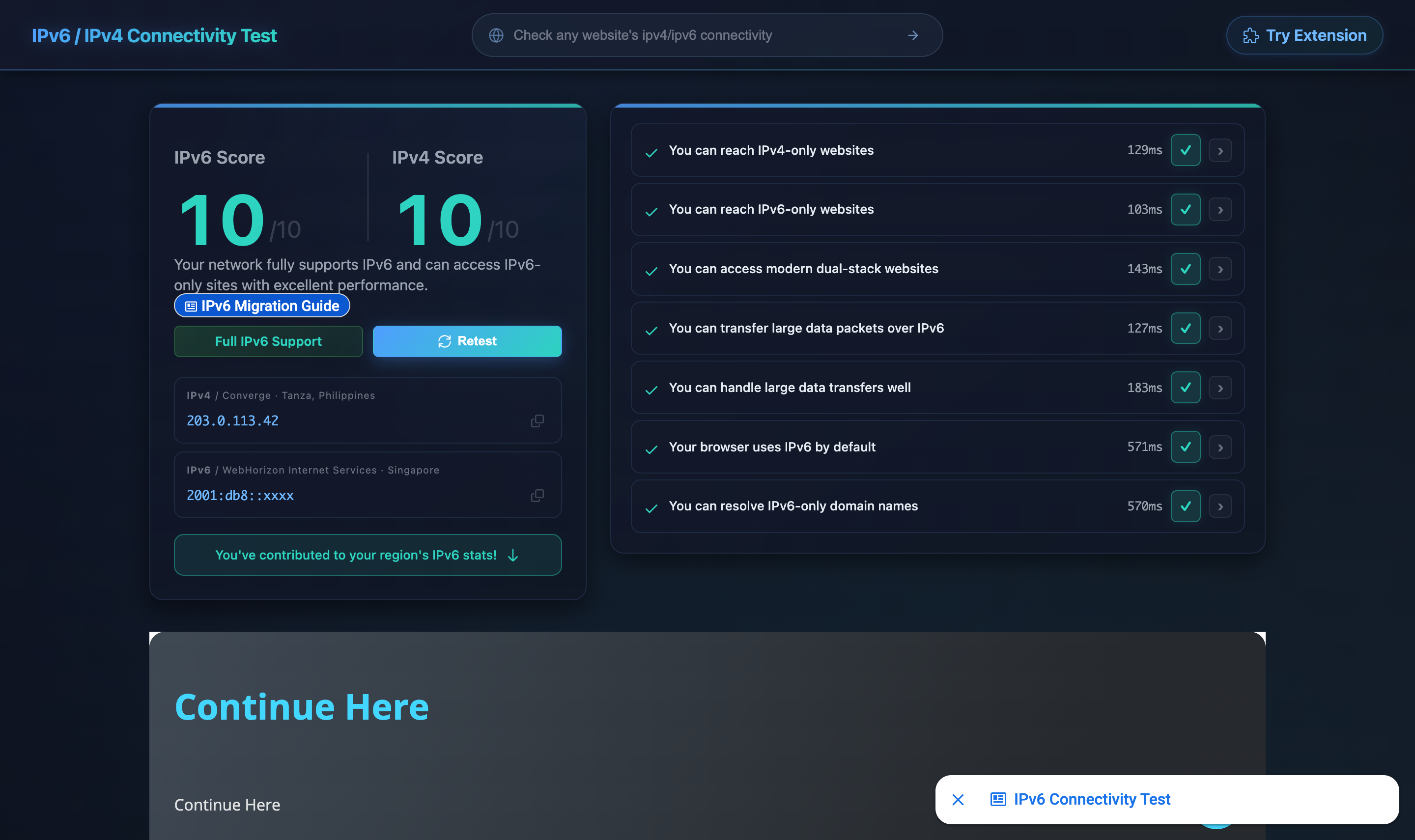
203.0.113.0/24) and RFC 3849
(2001:db8::/32) documentation prefixes.
A clean score on both rows means the address plan, the WireGuard tunnel, and the per-VLAN GUA all work together. Anything less than that, drop into the path post's verification block to see which layer is failing.
CGNAT is when your ISP shares one public IPv4 address across many
customers by NATing them behind a carrier-operated NAT. Your WAN
interface gets an address in RFC 6598
space (100.64.0.0/10) — not a public IPv4 — and the ISP handles port
translation upstream. It's common on residential fiber where public
IPv4 is scarce. Inbound IPv4 services (port forwards, HE 6in4) stop
working; outbound NAT still does.
Compare two addresses. Read the WAN IPv4 on your router (RouterOS:
/ip/address/print where interface=<wan>). Then check what
ipinfo.io or curl ifconfig.me reports. If the
router's WAN address starts with 100.64–100.127 (RFC 6598) or
otherwise differs from the public address, you're behind CGNAT.
No. HE's 6in4 uses IP protocol 41 (raw IPv6 inside IPv4), and carrier-grade NAT only translates TCP, UDP, and ICMP — protocol 41 packets get dropped. Use a WireGuard-based path instead: either the Route64 broker for a free routed /56, or a self-operated VPS routing a /48.
No. The Route64 broker path hands out a routed /56 over WireGuard with no VPS to operate. The VPS-routed /48 path is the alternative if you'd rather own the relay end and get a larger prefix. Both produce the same per-VLAN result; the rest of the build is identical either way.
Yes — the series finale,
Multi-homing IPv6 over CGNAT on RouterOS,
brings up the VPS and Route64 paths simultaneously under one
announceable /48, with BGP best-path selecting the active default and
BFD on the VPS session for sub-second failover. It is a clean-slate WAN
build (not a sequel to Parts 4 or 5) and requires a 32-bit ASN plus an
announceable /48 as hard prerequisites — Parts 4 and 5 stay as the
friction-low standalone reads for the single-uplink case.
A /48 gives you 65,536 /64 subnets; a /56 gives you 256. Both are ample for one /64 per home VLAN. /48 is the IETF "site allocation" size from RFC 6177; /56 is what consumer ISPs and most brokers (including Route64) hand out by default.
| Acronym | Expansion | Reference |
|---|---|---|
| AP | Wireless access point | Wikipedia |
| CGNAT | Carrier-grade NAT | Wikipedia |
| DHCP | Dynamic Host Configuration Protocol | RFC 2131 |
| DoH | DNS over HTTPS | RFC 8484 |
| GUA | Global unicast address | RFC 4291 |
| IoT | Internet of Things | Wikipedia |
| ISP | Internet service provider | Wikipedia |
| LAN | Local area network | Wikipedia |
| MTU | Maximum transmission unit | Wikipedia |
| NAT | Network address translation | Wikipedia |
| RA | Router advertisement | RFC 4861 |
| RDNSS | Recursive DNS Server option in RA | RFC 8106 |
| SLAAC | Stateless address autoconfiguration | RFC 4862 |
| SSID | Service set identifier (Wi-Fi) | Wikipedia |
| ULA | Unique local address | RFC 4193 |
| VLAN | Virtual LAN | Wikipedia |
| VPS | Virtual private server | Wikipedia |
| WireGuard | WireGuard VPN | wireguard.com |
2001:db8::/32)fd00::/8)Comments